The 10 Best Recipe Apps in 2026
Ten recipe apps compared on the thing that matters most: can you share a reel to it and get a recipe back. Plus planning, shopping lists, macros and what each one costs.
In this guide
Most of the recipes we want to cook are sitting in an Instagram Saved folder. A few more are TikTok bookmarks, screenshots, and actual cookbooks on the shelf. A recipe app is supposed to pull all of that into one place and, ideally, write the shopping list.
We build EasyToCook, so we are biased. We have tried to be fair anyway: every app below gets its problems listed, ours included. Prices are from the Australian App Store on 15 September 2026 and will change.
How we judged them
Mostly on one thing: can you tap Share on an Instagram reel and get a usable recipe back? Then whether it plans the week and builds a shopping list, whether it knows the calories, and how it feels to cook from. Price and platforms last.
That order is why the ranking looks the way it does. If you never save recipes from social media, skip straight to Paprika.
The 10 best recipe apps
1. EasyToCook
Built for recipes that live on Instagram and TikTok.
- Best for
- Anyone who saves recipes from social media and wants the plan, the list and the macros to come with them.
- Platforms
- iPhoneiPad
- Pricing
- Free to start. Pro is A$9.99 a month or A$59.99 a year, with a free trial on the yearly plan.
Strengths
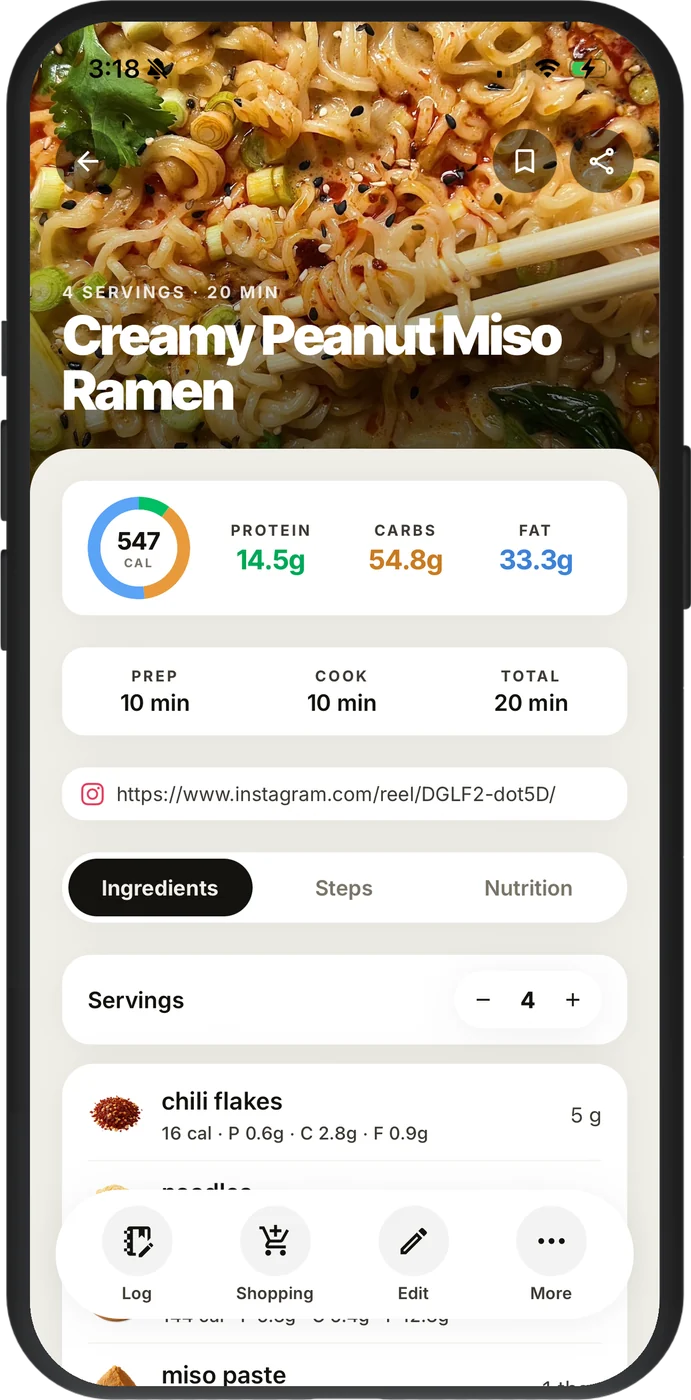
- Tap Share on a reel, TikTok, YouTube video, Facebook post or web page and it imports in the background. You get ingredients with quantities, numbered steps and calories, protein, carbs and fat per serve. Not a saved link.
- Point the camera at a cookbook page and that becomes a recipe too.
- Drop recipes onto days and the shopping list builds itself, grouped by aisle. Each day shows calories against your goal, and you log meals from a recipe, a barcode or a photo of the plate.
Watch-outs
- iPhone only. Android is coming but it is not here yet.
- The free plan caps AI imports. Unlimited imports, cookbook scanning and photo logging are Pro.
Verdict: The only app here that does capture, planning and macros in one place. If your recipes come from reels, start here.
2. ReciMe
The closest thing on Android.
- Best for
- Social media cooks on Android, or households with one of each phone.
- Platforms
- iPhoneiPadAndroidMac
- Pricing
- Free with 5 imports a week. ReciMe Plus starts at A$39.99 a year, with a 7-day trial.
Strengths
- Imports from Instagram, TikTok, Facebook, YouTube and Pinterest, and from Paprika, Notes, Google Docs and Notion if you are moving a collection across.
- Weekly planner with a grocery list you can sort by aisle or by recipe.
- iPhone and Android, so mixed households work.
Watch-outs
- Five imports a week runs out fast if you are the type who saves every reel.
- Nutrition is a Plus feature and there is no daily log.
Verdict: Pick this over EasyToCook if you need Android. Otherwise it is a close second.
3. Paprika Recipe Manager 3
Pay once. No social imports.
- Best for
- People whose recipes come from websites and who refuse to pay a subscription.
- Platforms
- iPhoneiPadMacWindowsAndroidApple Watch
- Pricing
- A$7.99 one-off on iPhone. Mac and Windows are separate purchases. Android is free for your first 50 recipes.
Strengths
- Web clipper with a built-in browser, offline access, scaling and unit conversion.
- A grocery list that merges duplicates, a pantry with expiry dates, and daily, weekly or monthly planning.
- Syncs across iPhone, iPad, Mac, Windows and Android.
Watch-outs
- Nothing for Instagram, TikTok or YouTube. You will be typing those in.
- No nutrition info, and the design has not moved in years.
Verdict: Still the best value going if your recipes come from websites.
4. Pestle
The best cook mode on iPhone.
- Best for
- Apple households who cook with the phone propped on the bench.
- Platforms
- iPhoneiPadMacApple Watch
- Pricing
- Free to start. Pro is A$4.99 a month, A$39.99 a year or A$59.99 for life.
Strengths
- Imports from Instagram, TikTok, Facebook, YouTube and websites, plus a scanner for printed recipes.
- Hands-free step-by-step cooking, timers picked out of the recipe, and SharePlay for cooking with someone in another kitchen.
- The planner covers the next 14 days and builds a shopping list from it.
Watch-outs
- Apple only, and it needs iOS 17.6 or later.
- No calories, macros or logging.
Verdict: If the cooking matters more than the numbers, this is the nicest app to stand at the stove with.
5. Crouton
Indie, polished, one-off price.
- Best for
- Apple users with website, PDF and handwritten recipes.
- Platforms
- iPhoneiPadMacApple Watch
- Pricing
- Free with a recipe limit. Crouton+ is A$19.99 one-off. Discover, an optional recipe feed, is A$2.99 a month or A$12.99 a year.
Strengths
- Imports from websites, PDFs and photos, with OCR for handwritten cards and cookbook pages.
- Cook mode with gesture control and automatic timers. It even pairs with Bluetooth scales.
- Weekly planner, shopping list, iCloud sync and family sharing.
Watch-outs
- Social links are hit and miss. It reads the caption, so if the recipe is only in the video you get nothing.
- Apple only, no nutrition.
Verdict: Lovely for website and cookbook recipes. Not for a Saved folder full of reels.
6. Mela
Minimal and very Apple.
- Best for
- People who want a clean recipe box and nothing else.
- Platforms
- iPhoneiPadMac
- Pricing
- Free to download. Mela+ is A$9.99 one-off on iPhone and iPad. The Mac app is a separate purchase.
Strengths
- Website import with a built-in browser, plus YouTube, TikTok and Instagram links.
- Scanner for cookbooks, feed subscriptions for recipe blogs, a planning calendar.
- Cook mode with timers, and the developer collects no data at all.
Watch-outs
- The grocery list is Apple Reminders.
- Apple only, no nutrition, and it is one developer so updates are slow.
Verdict: A clean recipe box that does not try to be a planner or a tracker. Some people want exactly that.
7. AnyList
A shared grocery list that keeps recipes on the side.
- Best for
- Households that mostly want a shopping list everyone can see.
- Platforms
- iPhoneiPadAndroidMacWebApple Watch
- Pricing
- Free for the list. Complete is A$14.99 a year, or A$22.99 a year for a household.
Strengths
- The best shared shopping list in this group: instant sync, aisle grouping, Siri and Alexa.
- Runs on iPhone, Android, Mac and the web.
Watch-outs
- Web recipe import and meal planning both need Complete. Nothing for Instagram or TikTok, no photo import.
- No nutrition info.
Verdict: Buy it for the list. The recipes are a bonus.
8. Recipe Keeper
A filing cabinet for recipes, on everything.
- Best for
- A big collection of printed and web recipes you want on a PC as well as a phone.
- Platforms
- iPhoneiPadAndroidWindowsMac
- Pricing
- Free to start. Pro is A$29.99 one-off on iOS, and you buy it again on each platform.
Strengths
- Web import from hundreds of sites and OCR for photos and cookbook pages.
- Planner, aisle-grouped shopping list, PDF and cookbook export, an Alexa skill.
- iPhone, Android, Windows and Mac.
Watch-outs
- No social imports.
- No nutrition or logging, and it looks its age.
Verdict: Fine if your recipes already exist as text and you want them everywhere.
9. Samsung Food
Free, everywhere, busy.
- Best for
- A free recipe box with a planner, if you can live with the feed.
- Platforms
- iPhoneAndroidWeb
- Pricing
- Free. Food+ is A$9.99 a month or A$99.99 a year.
Strengths
- Save from websites, scan photos of cookbooks, plan meals and shop, on iPhone, Android and the web, all free.
- Nutrition info on recipes. Food+ adds AI meal plans and nutrition tracking.
Watch-outs
- Social links are clipped from the caption, so results vary.
- It is a community feed as much as a recipe box, and you are inside Samsung's account and data policies.
Verdict: Hard to argue with free. Harder to love.
10. Copy Me That
Cheap and simple.
- Best for
- Clipping website recipes on a budget.
- Platforms
- iPhoneiPadAndroidWeb
- Pricing
- Free for 40 recipes. Membership from A$1.49 a month or A$16.90 a year, or A$99 for life.
Strengths
- Saves from most apps and browsers, including Instagram and Facebook.
- Collections, a meal planner, a shopping list and a proper web app.
Watch-outs
- A social save keeps the link and the caption. It does not turn it into a recipe.
- No nutrition, no photo scanning, and the design is dated.
Verdict: A clipper with a list attached. Everything above it does more.
Side by side
"Limited" means it accepts the link but only reads the caption. "Plus", "Complete" and "Food+" mean the feature is on that app's paid tier.
| App | Instagram / TikTok | Websites | Scan pages | Planner | Shopping list | Macros | Meal log | Android | Price |
|---|---|---|---|---|---|---|---|---|---|
| EasyToCook | Soon | Free + A$59.99/yr | |||||||
| ReciMe | Plus | Free + A$39.99/yr | |||||||
| Paprika 3 | A$7.99 one-off | ||||||||
| Pestle | Free + A$39.99/yr | ||||||||
| Crouton | Limited | A$19.99 one-off | |||||||
| Mela | Reminders | A$9.99 one-off | |||||||
| AnyList | Complete | Complete | Free + A$14.99/yr | ||||||
| Recipe Keeper | A$29.99 one-off | ||||||||
| Samsung Food | Limited | Food+ | Free + A$99.99/yr | ||||||
| Copy Me That | Limited | Free to 40, then A$16.90/yr |
Which one?
- Your recipes come from Instagram or TikTok: EasyToCook. ReciMe if you are on Android.
- You hate subscriptions: Paprika 3 or Crouton. Both skip social video.
- You cook from the phone: Pestle.
- The shopping list is the point: AnyList.
- You track calories: EasyToCook is the only one with per-serve macros on every recipe and a daily log built in.
Start where your recipes already are
Save a reel, a link or a cookbook page and EasyToCook turns it into a recipe with steps, macros and a shopping list. Free on iPhone.
Questions people ask
What is the best app for saving recipes from Instagram and TikTok?
On iPhone, EasyToCook. Tap Share on the post, pick EasyToCook, and it comes back as a recipe with ingredients, steps and macros. On Android, ReciMe. Pestle handles it too but has no nutrition.
Is there a good free recipe app?
EasyToCook is free with a cap on AI imports. ReciMe gives you 5 imports a week. Samsung Food is free with a feed attached. Copy Me That is free for 40 recipes. Paprika is not free but it is A$7.99 once.
Which recipe apps track calories and macros?
EasyToCook shows calories, protein, carbs and fat per serve on every recipe and logs meals against a daily goal. Samsung Food shows nutrition on recipes and tracks it on Food+. ReciMe calculates nutrition on Plus. The rest do not.
Is EasyToCook on Android?
Not yet. iPhone only for now, and Android is on the way. ReciMe is the closest match if you need it today.
Do I need a subscription?
No. Paprika 3, Crouton, Mela and Recipe Keeper are one-off purchases. The subscription apps are paying for the AI that reads videos and works out nutrition, which is why the best importers (EasyToCook, ReciMe, Pestle) are free to start and paid to go unlimited.
Sources
Prices and features were checked against these listings on 15 September 2026. Spot a mistake? Email support@easytocook.com.au.
- EasyToCook on the App Store · checked 15 September 2026
- ReciMe on the App Store · checked 15 September 2026
- ReciMe help: how the 5 free weekly imports work · checked 15 September 2026
- Paprika Recipe Manager 3 on the App Store · checked 15 September 2026
- Paprika Recipe Manager 3 on Google Play · checked 15 September 2026
- Pestle on the App Store · checked 15 September 2026
- Crouton on the App Store · checked 15 September 2026
- Mela on the App Store · checked 15 September 2026
- AnyList on the App Store · checked 15 September 2026
- AnyList recipes and Complete features · checked 15 September 2026
- Recipe Keeper on the App Store · checked 15 September 2026
- Samsung Food on the App Store · checked 15 September 2026
- Copy Me That on the App Store · checked 15 September 2026
More from the blog